

COURSE MAP MAKER
A disc golf course map maker for detailed hole maps
Draw each hole the way players see it from the tee: the fairway, trees, water, OB lines, mandos and the basket. Your hole maps go straight onto your tee signs, ready for print.
- Made for disc golfTee pads, baskets, OB lines, mandos, drop zones and next-tee arrows.
- Trace a referenceDraw over a course map or your own image.
- Free to designPay only for print-ready files or printed signs.
WHAT’S ON A HOLE MAP
Every feature a player needs to read the hole
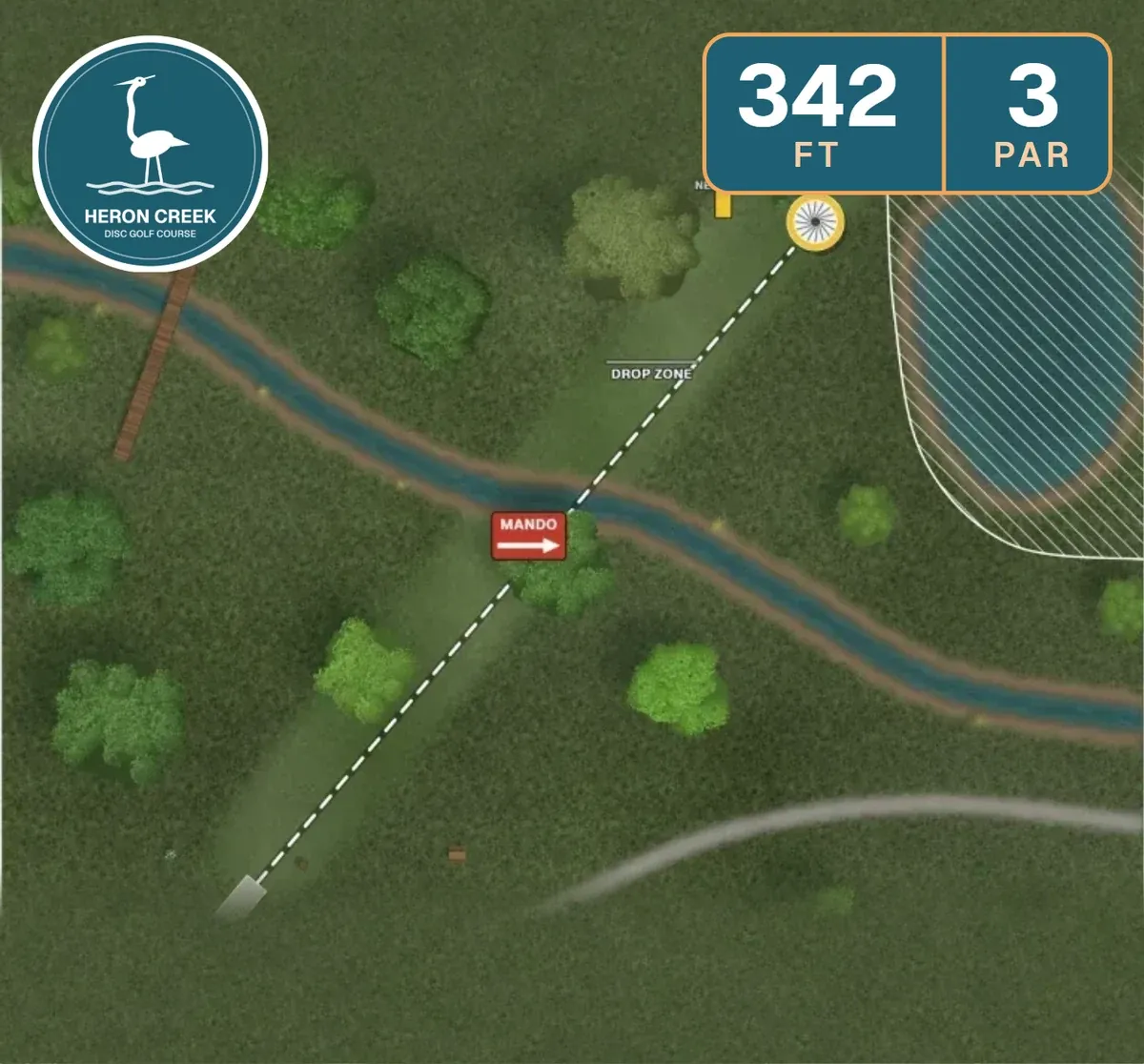
A good hole map shows where to throw and what to avoid. DGCS Studio has a map library of disc golf objects and natural features, so you place real course features instead of generic shapes.
- Tee pad Where the throw starts, with the flight line to the basket.
- Basket Mark each pin position you play.
- Mando Show the side players must pass.
- Drop zone Where to play from after a missed mando or OB.
- Out of bounds Hatched OB areas, like this pond and its bank.
- Creek and bridge Water, paths, bridges and park features.
- Trees Trees, bushes and tree lines that shape the shot.
- Next-tee arrow Point players toward the next tee.
WHAT YOU CAN MAP
Hole maps built from real course features
-
Disc golf objects
Tee pads, baskets, OB lines, mandos, next-tee arrows and drop zones.
-
Fairways and flight lines
Shape each fairway and show players the line to throw.
-
Trees, terrain and hazards
Trees, bushes, terrain surfaces, water and creeks, paths, bridges and park features.
-
Reference maps
Trace over a course map or your own image. The built-in street and satellite reference layers never print.
-
Sunlight and shadows
One sun direction for the whole course, with adjustable shadow length, softness and opacity.
-
Full sign or map only
Switch views to focus on the map, then check it on the finished sign.
MAP DESIGN
Built into the tee sign editor
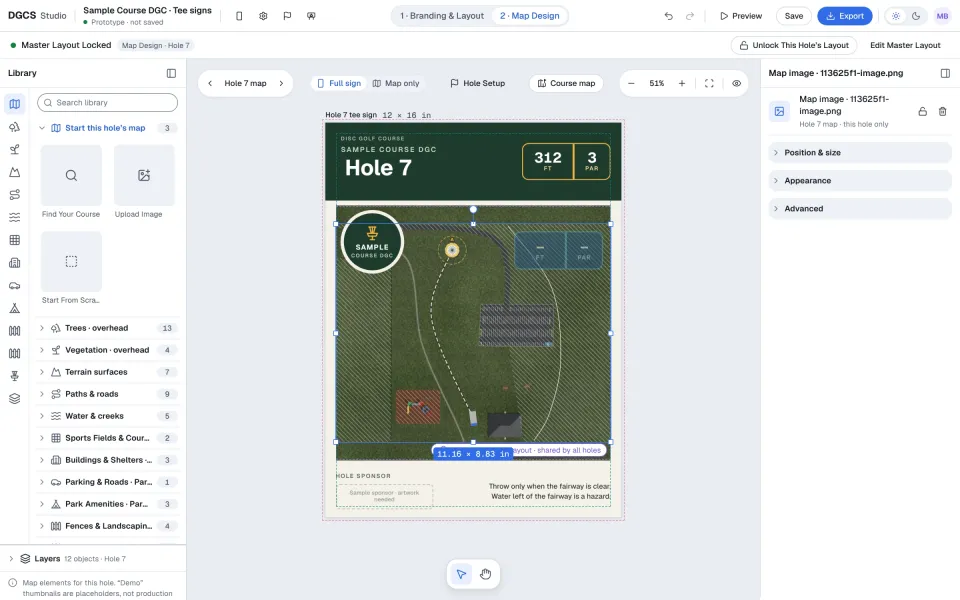
Hole maps aren’t a separate tool. Switch to Map Design, draw the hole, and the map updates on the sign you are designing, in the layout and size you chose.
- Map library Disc golf objects and natural features, ready to place.
- Map settings Ground, reference map and sunlight for each hole.
- Multiple tees and baskets Add alternate tees and pin positions to the same hole.
- 300 DPI output Print-ready files render at 300 DPI.
HOW IT WORKS
Map a hole in three steps
-
STEP 1
Trace and lay out the ground
Start from your course map or an image of the hole, then draw the fairway, trees, water and paths over it.
-
STEP 2
Place disc golf objects
Add the tee pad, baskets, OB, mandos, drop zones and the next-tee arrow.
-
STEP 3
Check it on the sign
Switch to the full sign, generate a free proof, and adjust before you order.
ON EVERY LAYOUT
Your hole maps, on every tee sign template
The same Heron Creek hole map in four starting layouts. The map follows whatever template you choose.
-

Classic
Header bar, map below.
-

Map Hero
The map fills the sign.
-

Split Panel
Details in a side column.
-

Number Badge
A bold hole-number badge.
Heron Creek is a sample course.
No. Hole maps are drawn by hand, optionally over a reference image, and you enter each tee’s distance and par yourself.
No. DGCS Studio is for detailed maps of each hole on its tee sign. It isn’t a course routing or navigation tool. A next-tee arrow can point players toward the next tee.
Yes. Add your course map or an image of the hole as a reference and draw over it. The built-in street and satellite reference layers never print.
Yes. Add alternate tees and pin positions, each with its own distance and par. Watch the tutorial
Designing and drawing maps is free, including watermarked proofs. Print-ready files are $7 per unique hole, and printed signs start at $45 per sign. See pricing
Print-ready files render at 300 DPI. Check a free watermarked proof of every sign before you order.